
For the people who lead the teams
and the ones who build, in 11 chapters
AI builds software faster. Rabbinatix helps teams understand it and work together. 201 seconds through the real product on a demo organization: first how leads settle problems between teams, with team issues, team health and release sign-off; then one team plans it, lets its assistant build it, proves what it built and ships it safely.
AI builds software faster. Rabbinatix helps teams understand it and work together.
Your assistant can write a service in an afternoon. Knowing what it touches, what it breaks, which team it breaks and who accepted it is the slow part. First what leads and managers get, then one team from a sketch to a release, on the real product with a demo organization of thirteen systems.
Play the tour
201 seconds, with music
Read the tour instead
1. Welcome
AI builds software faster. Rabbinatix helps teams understand it and work together.
Your assistant can write a service in an afternoon. Knowing what it touches, what it breaks, which team it breaks and who accepted it is the slow part. First what leads and managers get, then one team from a sketch to a release, on the real product with a demo organization of thirteen systems.
2. Lead
One tracker for the problems between teams
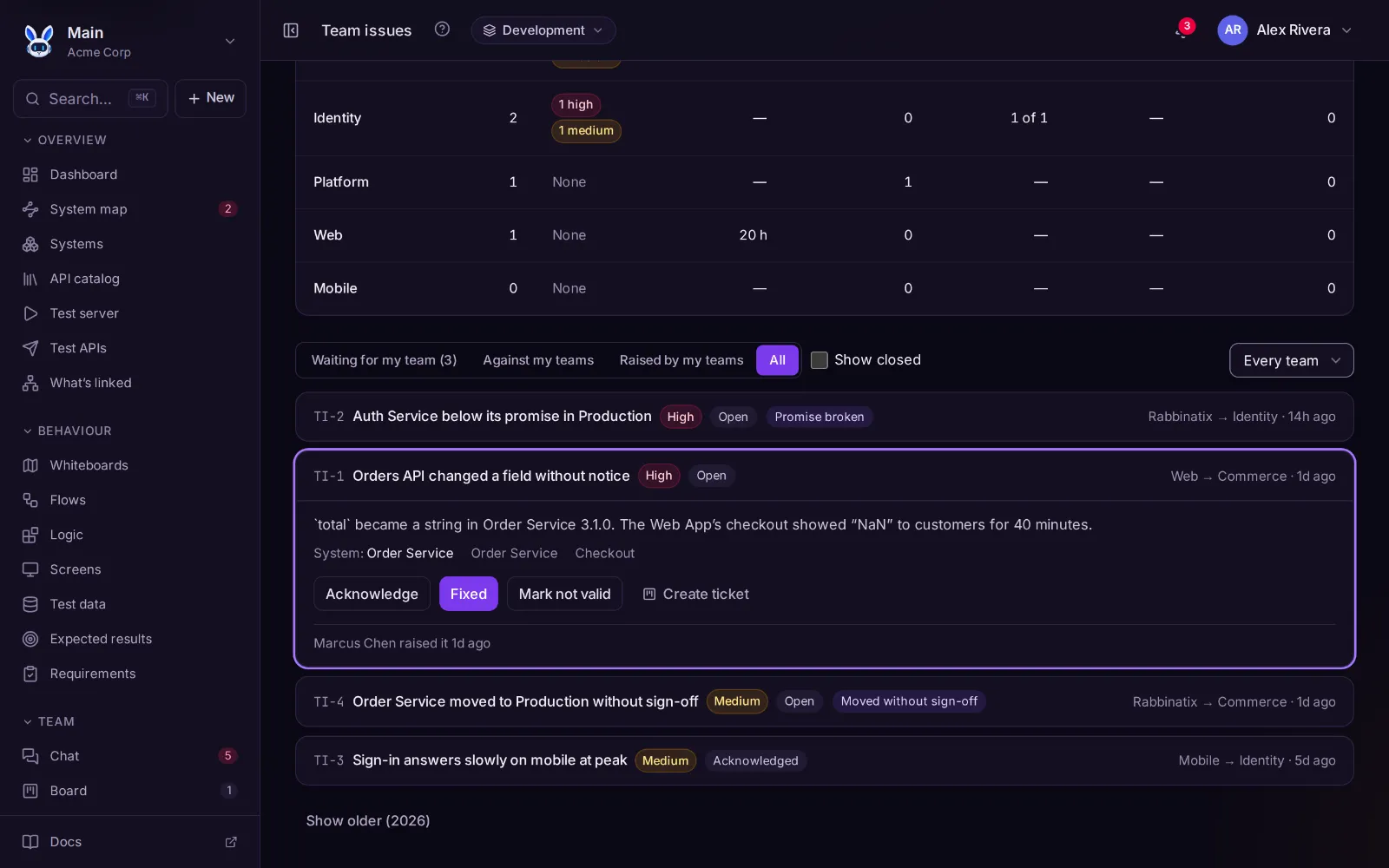
When one team’s change breaks another team’s work, a lead raises a team issue against the team that caused it, with the system and the flow it hit. Rabbinatix raises its own too: a promise broken, a sign-off answered late, a release moved without one. The team it is against acknowledges it, fixes it and says what fixed it, and every step stays on the issue.
See which teams need help, in numbers
Team health puts every team side by side: issues raised against them in 30 days, open ones by severity, the median time to fix, issues marked not valid, sign-offs answered late and releases moved without sign-off. Bring the numbers to the next review, not the loudest story.
The teams a release affects say yes before it ships
When a release goes to Production, the teams whose systems call it are asked to sign off, with the calls that change and the ones that break. Each answer is recorded on the release. Ask records the answers; Require holds the release until every team has signed off.
Promises between teams, measured for you
The team that owns a system promises the teams that use it: up at least 99.9%, answers within 300 ms, 14 days’ notice before a breaking change, down fixed within 4 hours. Both sides agree it, Rabbinatix measures it from the health checks and releases, and a broken promise raises a team issue by itself.
Releases, time away and deadlines on one calendar
Planned releases, who is away and who stands in, public holidays, meetings and the days promises are reviewed. Sign-offs go to whoever stands in for a lead who is away, and due dates skip the days a team isn’t working.
Know who to ask, for every system
Who reports to whom, each person’s position, and the departments that hold the teams. Every system shows who to ask: its team’s lead, then that lead’s manager. A late sign-off or an open team issue says whom to ask when the lead doesn’t answer.
3. Plan
It starts with people, not prompts
The team sketches the sign-in journey together: the screens, the systems, the open questions. A teammate reviews it and approves it before anyone writes code, by hand or by assistant.
Write down what must be true
Each requirement says what the software must do, in words the whole team reads. It shows as not verified until a flow meets it and a test case proves it, so "done" means proven, not merged.
4. Build
Let your assistant build
Connect the assistant in your editor with a key you control. It reads the requirements, flows and logic, and drafts systems, APIs, flows, logic and screens for them, or maps the code you already have.
Ask your own AI about the map, in chat
Bring your own Claude, ChatGPT or Gemini key and ask in chat: who owns orders, what breaks if this field changes, draft the logic for a refund. It looks things up on the map, says what it looked at, and anything it writes waits as a draft.
Fast to write, nothing live without you
Everything the assistant writes waits as a draft: each change side by side with what was there, and anything worth a second look flagged. You accept it or reject it, and it stays marked as written by an assistant and accepted by you.
See every system it touched
Apps, services, databases and partners on one map. Each line carries the APIs between two systems and the status of their contracts, so a new service never arrives unseen.
Down to the field that changed
What a caller expects is compared with what the provider offers, field by field, on every change. A mismatch says who breaks and how to fix it.
Screens as a design guide
Design the pages of the web and mobile apps from widgets, the way you would in a design tool. Click them through, put them on whiteboards, and hand them on as plain HTML and CSS.
Or start from what already exists
Bring OpenAPI, Postman, Pact or a browser recording, or copy a ready-made package from the store: flows such as sign-in and registration, logic, whiteboards and whole architectures, more than 130 in all.
5. Understand
Play the journey across every system
A flow follows one journey, step by step, through every system it touches, each step calling a real API. Play it and watch each step light up.
What each step does, as blocks
Check the input, look up the user, decide, call another system, answer. The logic behind every step is blocks you can open and change, and it also reads as plain text steps.
Read what it wrote as a flowchart
The same logic as a flowchart: steps in order, decisions as diamonds, every way out labelled. Review what the assistant wrote at a glance, and click any step for its details.
Ask how it fits together
What does the web app call? Where is this logic used? Which flows have no test cases? Ask in the command palette and get answers from the map, linked to the exact place.
6. Prove
Prove it, the normal case and the unusual ones
Test cases are acceptance tests for the flow, with test data for what each database or API answers: a valid user, a suspended one, a declined card. Run them all, step back through any run and see the data at every step, whoever wrote the logic.
Requirements turn green when they are proven
From the requirement to the flows that meet it, the test cases that prove it and their latest runs. When they pass the requirement is verified; when one fails it says so.
7. Review
See what changed, and who wrote it
Every flow and logic changed this week, by whom, and whether an assistant wrote it. Catch up after a day away in a minute, not a morning of diffs.
Know where the risk is
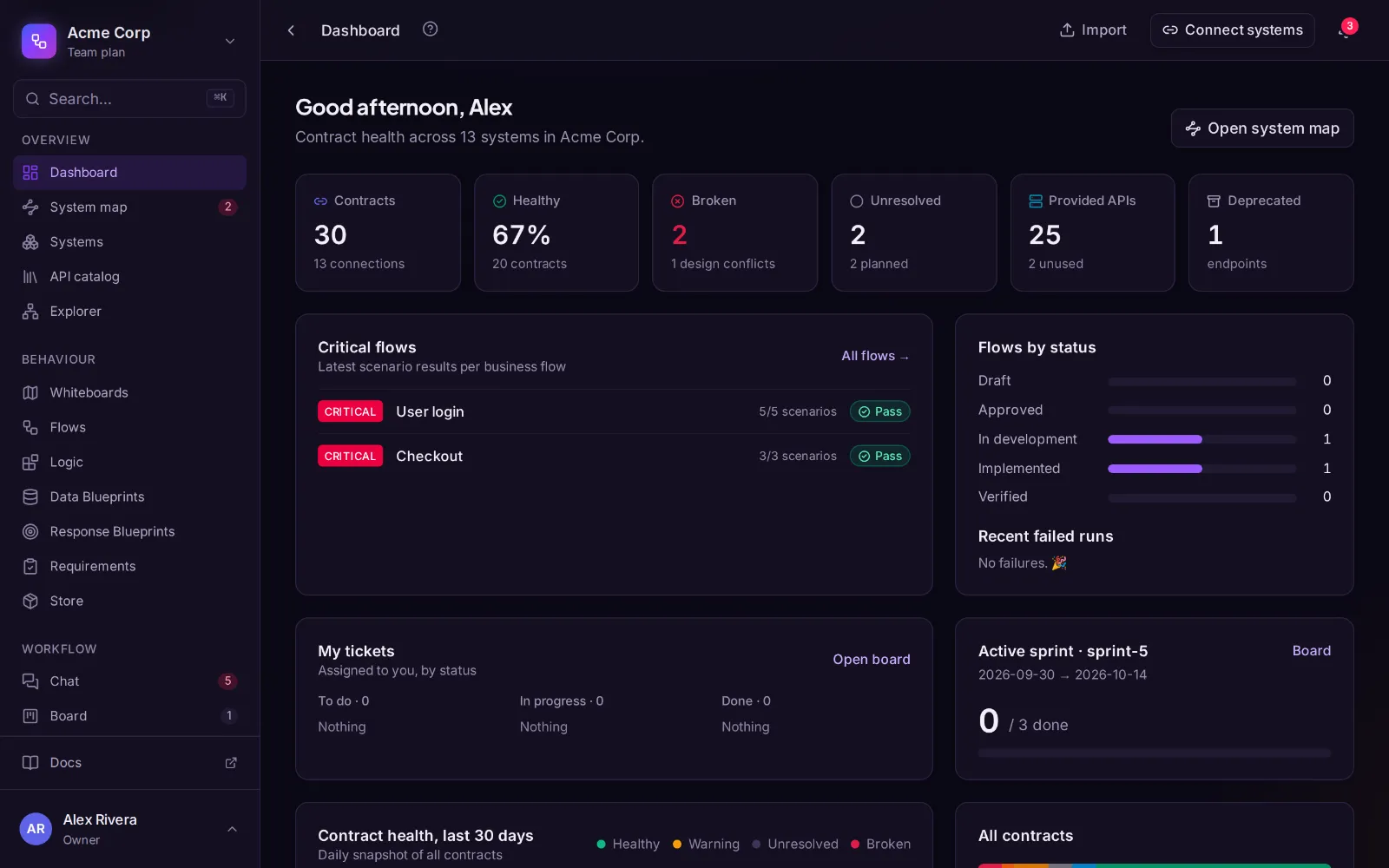
Back on the dashboard: each critical flow with what to look at, assistant changes nobody approved, contracts on its way that are not healthy, test cases that fail or never ran.
8. Change
Every day after: try a change before you make it
Turn on Draft mode and change an API. The map shows which connections would break, the flows it affects and which teams to tell, before anything is saved.
Know what a pull request touches
The Rabbinatix command line reads the pull request on your machine and follows the changed lines to the logic and APIs they reach. The report says which flows it affects, which test cases to run, and what isn’t on the map yet.
Ask before you deploy
Check a release against everything running in an environment: each caller’s contracts and the critical flows’ test cases. Your pipeline asks the same question before it deploys.
9. Ship
Take the code, in your language
All the logic becomes code: TypeScript, Python, Java, C#, Go and six more languages, checked against the same test cases before you download it, so what you release is what you reviewed.
See which services are up
Point a check at each health endpoint and say what its answer means. Checks run while the Connections view is open, and a service that goes down opens a ticket.
Catch mismatches in the browser
Drop one file into your frontend. In development it checks every real response against the contract and flags what no longer matches.
10. Team
Broken things turn into work
A contract that breaks or a test case that fails opens a ticket by itself, linked to the flow step it affects.
Talk about the flow, not around it
Discuss any system, contract or flow in a channel. Mention one and it shows its live status; a message becomes a ticket in one click.
11. Start
Let AI build it. Understand it with Rabbinatix.
The Free plan is the whole platform for one person or a team of up to 3, with 10 systems. Standard adds team issues, release sign-off, promises, the team calendar, the org chart and chat with your own AI, at $12 per member a month. Or let us map it with you, from $1,500.
Your first flow in minutes
Sign up on your own or with your team, sketch or import what you have, and design your first flow. The free plan is the whole platform: no card and no trial clock.